Choose your connection
Connect your supported AI or use a compatible free model through Engine.
Products / NXTdeal Engine
Use NXTdeal through a dedicated desktop client. Connect your supported AI or a compatible free model, and get help with supported conversion steps.
The everyday challenge
Your AI can only help with the operation when it has the right context and access. The useful question is what it can do with the dealership information and permissions you choose to provide.
Take the controls
Fictional dealership data. Explore working reports and connected workflows in this website simulation; it is not the live NXTdeal interface.
Explore three scripted Engine sessions: a morning operating report, a conversion review, or an inventory decision. Each shows the records behind the answer.
What needs my attention before the store opens? Show me the source records and prepare the follow-ups.
Run a request to see a report, its source records and the changes proposed for your approval.
Scripted product illustration using your ai connection; no model is contacted. Real actions depend on supported connections, permissions and available workflows.
Inside the product
Actual web-platform screens shown here. The interactive example above illustrates Engine’s workflow.
NXTdeal’s actual daily overview, showing dealership priorities and quick actions with demo data.
View full-size screenshot ↗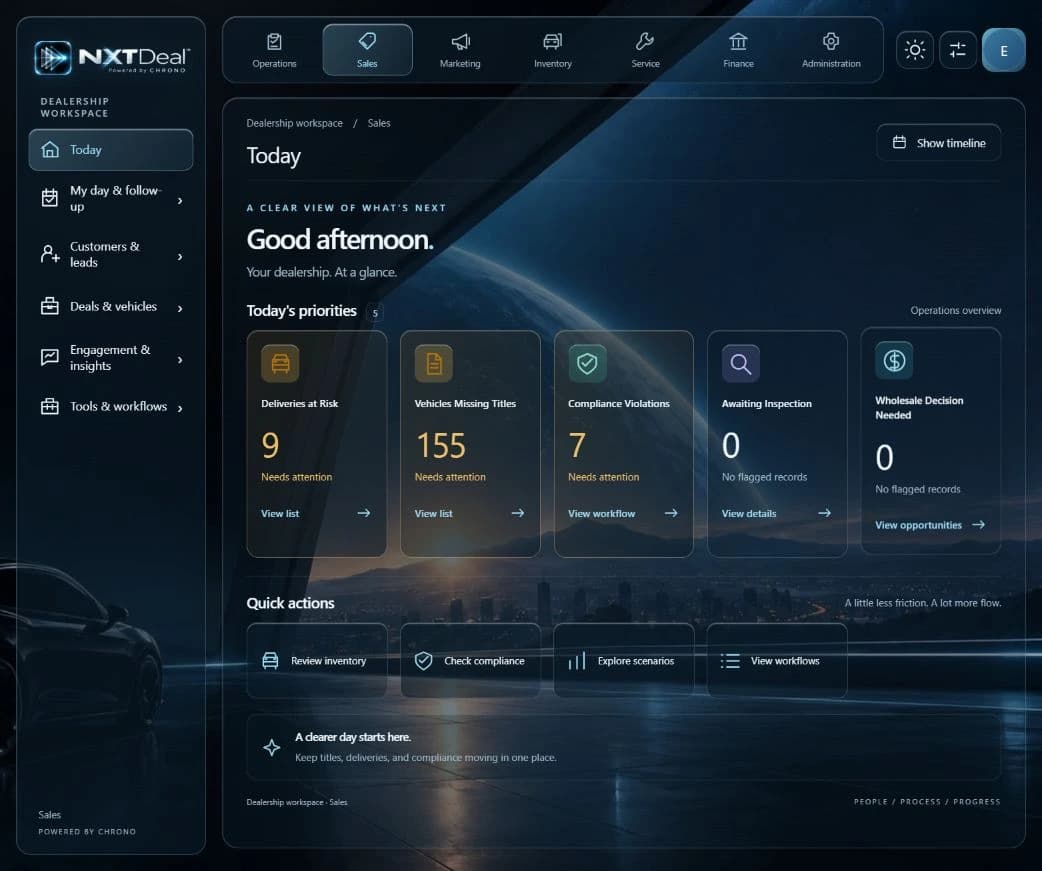
From the example to your operation
Connect your supported AI or use a compatible free model through Engine.
Work with the dealership records available to your role and the supported connection.
Use your permissions and the supported workflow to review and carry out the work.
How it fits your dealership
Choose the AI connection that suits your operation.
Review migration mappings and exceptions.
Keep permissions and dealer approval in the workflow.
A practical starting point
Choose a supported AI connection, confirm its access, and begin with a small workflow you can review.
Before you begin
Connection and billing requirements vary by provider. A chat subscription and API usage can be different products; check the connection you plan to use.
Engine can support compatible free models on suitable hardware. Model capability and hardware requirements vary; a local model does not make the entire dealership platform offline.
Yes. Engine also helps automate supported conversion steps. Review the source, mapping, exceptions, and imported result before relying on it.
No. Explore these examples, then start free. Try your choice of Pro features for 30 days and choose whether to continue on a paid plan or return to Free.
Your next step
Start free for up to 20 users. Try your choice of Pro features for 30 days. Dealership Lab is included for everyone.
Use the capabilities in your plan, connect supported systems, and choose your own AI. AI-led guidance helps you get started.