Choose the arrival experience
Let the customer work with an advisor or use a supported kiosk experience.
Solutions / Service & Parts
Coordinate check-in, service tasks, parts readiness, and customer updates in the same dealership platform.
The everyday challenge
The appointment, customer arrival, work order, parts, and technician readiness all affect the same job. The service lane works better when the next step is visible across the operation.
Take the controls
Fictional dealership data. Explore working reports and connected workflows in this website simulation; it is not the live NXTdeal interface.
Select a work order, confirm parts and technician readiness, then move it through the shop. See queued hours and completed work update.
Oil service and brake inspection. Bay 2 · Alex · awaiting readiness confirmation.
Inside the product
Captured from NXTdeal. Explore the screens, then try the product in your own dealership.
The actual service workspace: appointments, repair orders, technician dispatch and work-queue filters. The selected queue is empty in this capture.
View full-size screenshot ↗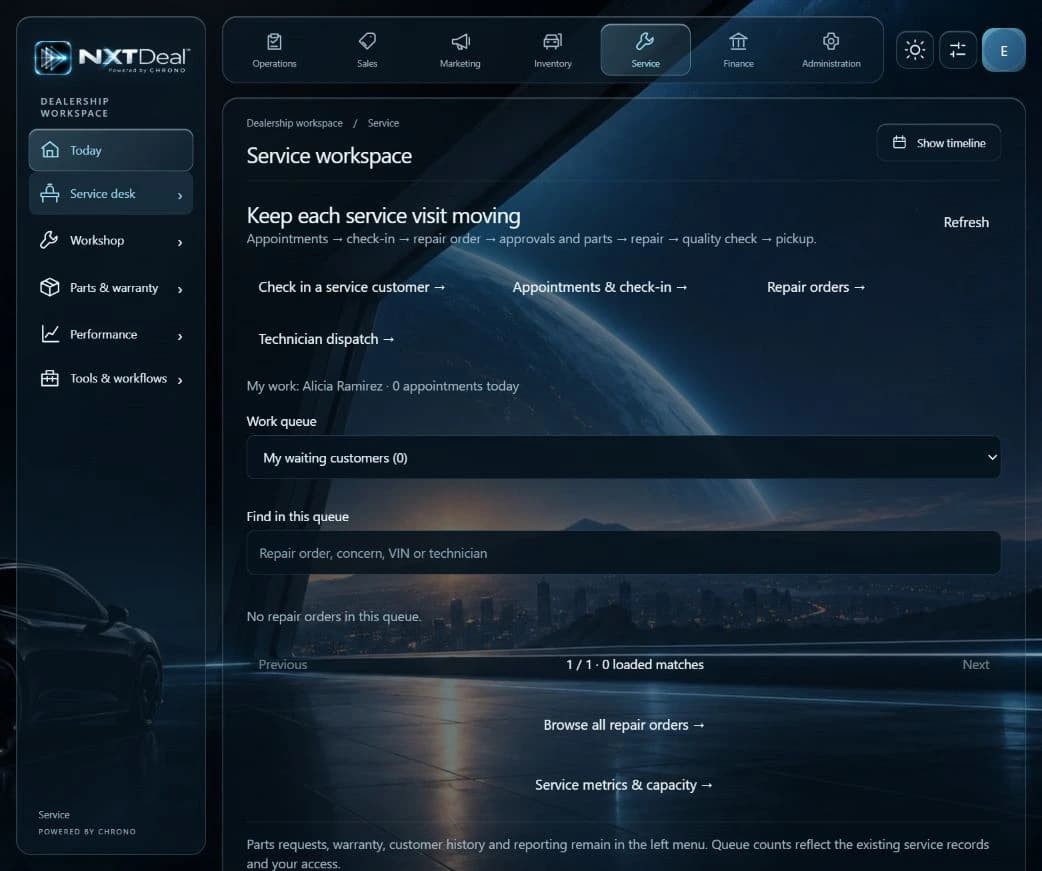
From the example to your operation
Let the customer work with an advisor or use a supported kiosk experience.
Bring the job, required parts, and assignment into the operational view.
Carry the service context into customer updates and future follow-up.
How it fits your dealership
Give the shop a shared view of the next job.
Connect parts readiness to the work order.
Offer a kiosk path for customers who prefer it.
A practical starting point
Map an everyday service journey, confirm the apps and connections it needs, and try that workflow before expanding.
Before you begin
Yes. Begin with the supported service workflows and connections that fit your operation, then expand when you choose.
No. OEM compatibility, certification, and program requirements must be confirmed for your store. We welcome OEM collaboration.
No. Explore these examples, then start free. Try your choice of Pro features for 30 days and choose whether to continue on a paid plan or return to Free.
Your next step
Start free for up to 20 users. Try your choice of Pro features for 30 days. Dealership Lab is included for everyone.
Use the capabilities in your plan, connect supported systems, and choose your own AI. AI-led guidance helps you get started.