Choose the arrival experience
Let the customer work with an advisor or use a supported kiosk experience.

Industries / Franchise Dealerships
Bring CRM, BDC, marketing, sales, and fixed operations into one platform. Adopt department by department, with OEM and provider compatibility checked for your store.
The everyday challenge
The appointment, customer arrival, work order, parts, and technician readiness all affect the same job. The service lane works better when the next step is visible across the operation.
Take the controls
Fictional dealership data. Explore working reports and connected workflows in this website simulation; it is not the live NXTdeal interface.
Bring fixed operations into the same operating view as the customer relationship. Find the bottleneck, work the job, then test a scenario.
5.5 labor hours are waiting. Check the required parts and technician assignment before releasing work into the shop.
Starting snapshot of one department. Open the work queue for current results as you make changes. Check provider / OEM compatibility where needed.
Select a work order, confirm parts and technician readiness, then move it through the shop. See queued hours and completed work update.
Oil service and brake inspection. Bay 2 · Alex · awaiting readiness confirmation.
Change staffing, available hours and productive utilization. Compare modeled capacity with an 11-hour sample workload before changing the shop plan.
Capacity = technicians × hours × utilization. This simplified model excludes parts delays, technician skill mix and bay restrictions.
Illustrative scenario arithmetic. No forecast, live account change or staffing recommendation is being made.
Franchise Dealerships
Inside the product
Captured from NXTdeal. Explore the screens, then try the product in your own dealership.
The actual service workspace: appointments, repair orders, technician dispatch and work-queue filters. The selected queue is empty in this capture.
View full-size screenshot ↗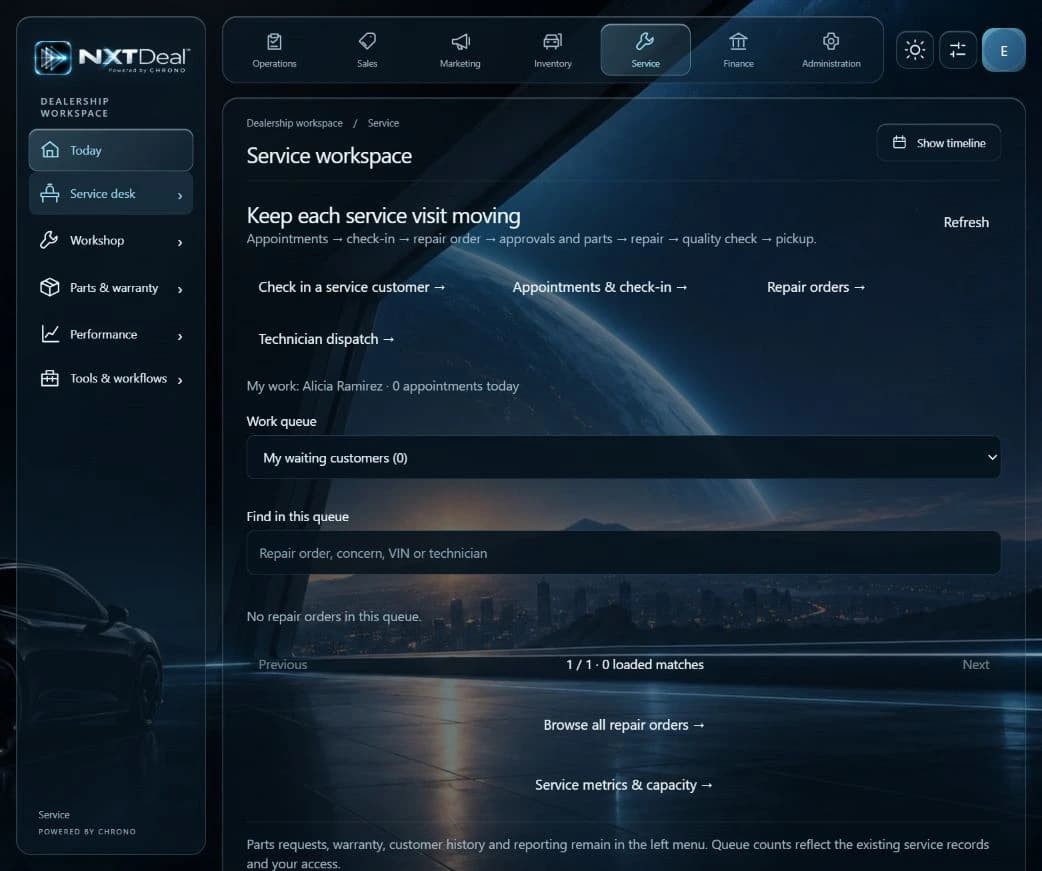
From the example to your operation
Let the customer work with an advisor or use a supported kiosk experience.
Bring the job, required parts, and assignment into the operational view.
Carry the service context into customer updates and future follow-up.
How it fits your dealership
Choose capabilities without a franchise-only surcharge.
Connect customer context across sales and service.
Explore OEM connections through Marketplace collaboration.
Your modules. Your way of working.
One platform, with the capabilities in your package ready to switch on when you need them. Dealership Lab, your choice of AI and data export come with every plan.
$999 / location / month
12-month contract · billed monthly
For a franchise location bringing its departments together with supported franchise and OEM workflows.
20 Basic + 20 Full Access users
Extra Basic seats: $3/user/month. Extra Full Access: $25/user/month.
USD. Prepay 1 year to save 10%, 2 years to save 20%, or 3 years to save 30%; the full selected term is paid upfront. Beta is coming soon; join the interest list today. Taxes, AI, messaging and other third-party charges are separate. Supported features and connections vary.
A practical starting point
Map an everyday service journey, confirm the apps and connections it needs, and try that workflow before expanding.
Before you begin
Yes. Begin with the supported service workflows and connections that fit your operation, then expand when you choose.
No. OEM compatibility, certification, and program requirements must be confirmed for your store. We welcome OEM collaboration.
No. Explore these examples, then start free. Try your choice of Pro features for 30 days and choose whether to continue on a paid plan or return to Free.
Your next step
Start free for up to 20 users. Try your choice of Pro features for 30 days. Dealership Lab is included for everyone.
Use the capabilities in your plan, connect supported systems, and choose your own AI. AI-led guidance helps you get started.